How to Write a LinkedIn Headline That Gets You Found by Recruiters in 2026
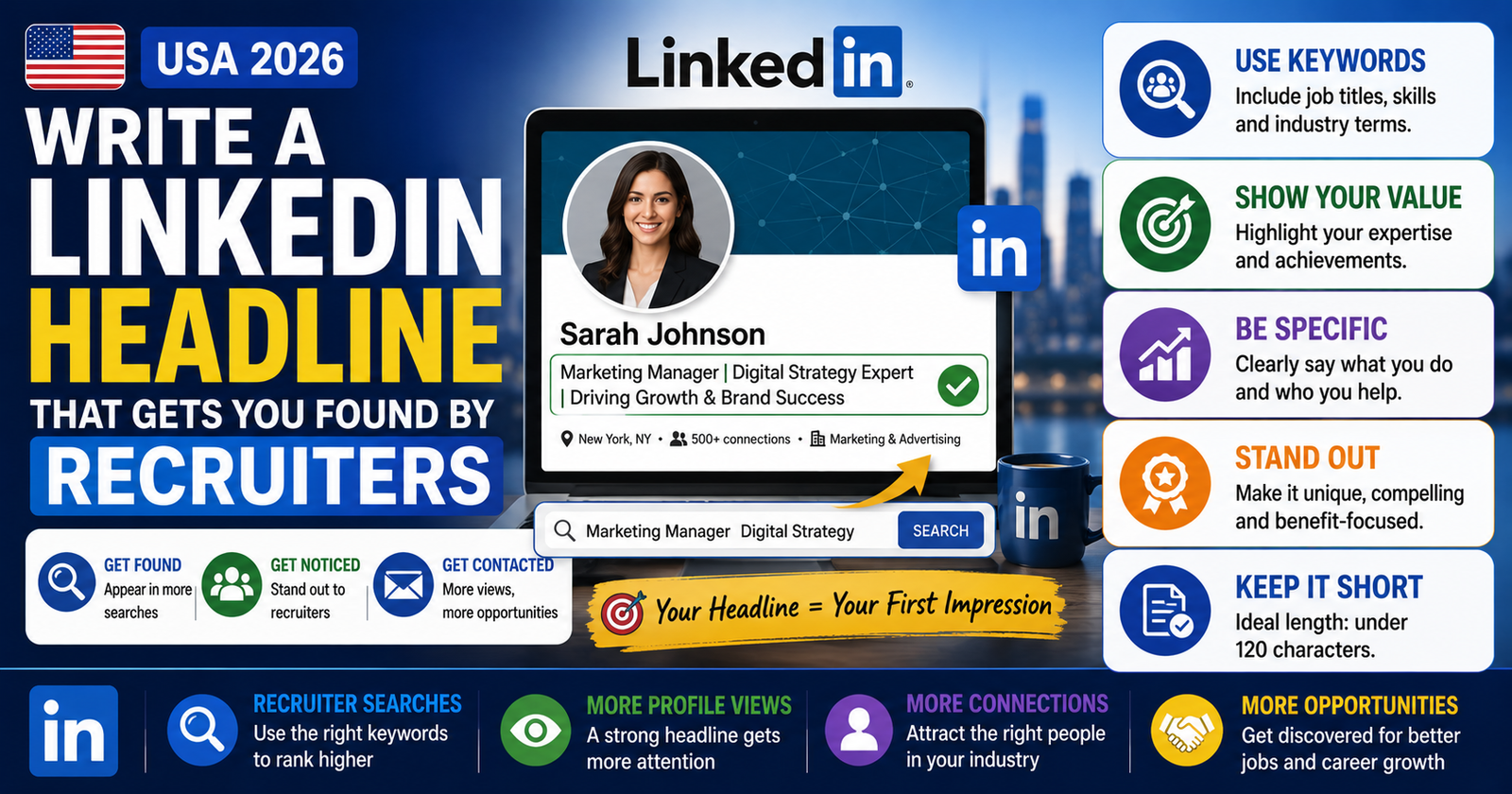
Your LinkedIn headline is the most-searched piece of text on your entire profile. LinkedIn’s algorithm weighs it more heavily than your job titles, summary, or skills section when recruiters run searches. Those 220 characters under your name determine whether you show up in recruiter searches at all – and whether they click your profile when you do. This guide covers exactly how to write a headline that works, with real examples for every type of job seeker.
Why Your LinkedIn Headline Matters More Than You Think
Most people on LinkedIn use their current job title as their headline. That’s a missed opportunity. Your headline appears in at least five high-visibility places on LinkedIn: your profile page, search results, connection request previews, comment threads, and recruiter InMail. Every time someone sees your name on LinkedIn, they see your headline right alongside it.
LinkedIn’s search algorithm uses your headline as one of its strongest ranking signals. When a recruiter in Chicago types “Project Manager PMP Agile” into LinkedIn Recruiter, the platform scans profile headlines first. If those words aren’t in your headline, your profile may not appear – even if they’re buried in your experience section.
LinkedIn auto-fills your headline with your current job title when you first create a profile. That’s the default – not a recommendation. Your headline is a separate field you control. You can and should write it specifically to reflect the role you want and the keywords that will get you found, not just the title you currently hold.
Beyond search, your headline shapes first impressions in under three seconds. When a recruiter sees 50 profiles in a search result, they read headlines to decide which profiles to click. A headline that clearly communicates your role, specialty, and value gets the click. A vague or generic one gets scrolled past.
What US Recruiters Actually Search For
Understanding how recruiters use LinkedIn search is the single most useful thing you can do before writing your headline. US recruiters – particularly those using LinkedIn Recruiter, the paid version of the platform – search by a combination of these factors:
- Job titles – They type in the title they’re hiring for. If you want to be found for “Data Analyst” roles, that phrase needs to be in your headline.
- Hard skills and tools – Specific software, platforms, certifications, and technical skills. Examples: “Salesforce,” “Python,” “AWS,” “CDL-A,” “QuickBooks,” “Epic EHR.”
- Industry or specialty – “Healthcare,” “SaaS,” “B2B,” “K-12,” “Logistics,” “Commercial Real Estate.”
- Certifications and credentials – “PMP,” “RN,” “CPA,” “SHRM-CP,” “Series 7,” “PE,” “LEED.”
- Location signals – For in-person roles, having a US city or state in your headline can boost local recruiter visibility.
Nobody searches LinkedIn for “hardworking,” “team player,” “motivated,” “go-getter,” “guru,” “ninja,” or “thought leader.” These phrases fill up character space without adding any searchability. Every word in your headline should be something a recruiter might actually type into a search bar.
The practical takeaway: open five to ten job postings for roles you want and look at the titles and skills they list in the first two lines. Those are your headline keywords.
The 220-Character Limit: How to Use It
LinkedIn allows 220 characters in your headline on desktop. On mobile and in search results, only the first 60-70 characters display before being cut off. This means the most important information – your job title and top skill or credential – needs to come first.
Here’s how to think about the space:
- First 60-70 characters: Your job title and most critical credential or skill. This is what shows in search previews.
- Characters 70-150: Additional skills, specialties, or industry context that add searchability.
- Characters 150-220: A brief value statement, niche detail, or second specialty – optional but useful for profile visitors who read the full headline.
💡 Character Budget Example
First 70 chars (visible in search):
“Registered Nurse | ICU & Critical Care | CCRN Certified”
Full 220-char headline:
“Registered Nurse | ICU & Critical Care | CCRN Certified | 6 Years Texas Hospital Experience | Epic EHR | BLS/ACLS”
The most important qualifier (RN + ICU + CCRN) leads. The rest adds depth for anyone who clicks through.
Proven LinkedIn Headline Formulas
You don’t need to build your headline from scratch. These four formulas cover the most common situations US job seekers face.
Formula 1 – For Active Job Seekers
Best for: People actively looking for a new role
The “Open to Work” signal at the end is optional if you’ve already turned on LinkedIn’s green banner, but it adds a direct text keyword some recruiters search for.
Formula 2 – For Experienced Professionals
Best for: 5+ years of experience with measurable results
Example: “Senior Account Executive | SaaS B2B Sales | Salesforce | $2M+ Annual Quota Achiever”
Formula 3 – For Career Changers
Best for: Switching industries or roles
Example: “Aspiring UX Designer | User Research | Figma | Former K-12 Teacher”
Formula 4 – For Freelancers and Contractors
Best for: Independent contractors, consultants, 1099 workers
Example: “Freelance Copywriter for SaaS & Tech Brands | SEO Content | Email Campaigns | Remote”
⚡ Write Your LinkedIn Headline in Seconds
Use the USAJobsKit LinkedIn Headline Generator to build a keyword-rich, recruiter-ready headline for your profile – no blank page required.
Use Free LinkedIn Headline Generator →Headline Examples by Job Type
Here are real-world headline examples written for common US jobs. Each one is keyword-rich, fits within the 220-character limit, and leads with the most important information.
Healthcare
Technology
Sales and Marketing
Finance and Accounting
Education
Skilled Trades
Human Resources
Adjusting by Career Stage
Your approach to the headline shifts depending on where you are in your career. Here’s how to adapt:
| Career Stage | Priority in Headline | What to Avoid |
|---|---|---|
| Student / Recent Grad | Target job title, degree field, relevant coursework, internship experience | Listing your GPA, writing “Seeking opportunities” |
| Early Career (1-4 yrs) | Job title, top 2-3 tools or skills, industry specialty | Vague descriptors like “motivated” or “results-driven” |
| Mid Career (5-10 yrs) | Specific title, certifications, measurable differentiator | Listing every job title you’ve ever had |
| Senior / Executive | Leadership scope, industry, one signature result or credential | Being too vague (“Senior Leader | Strategy | Growth”) |
| Career Changer | Target title first, transferable skills, former background as context | Leading with your old title when you’re leaving that field |
| Freelancer / Contractor | What you do, who you do it for, availability signal | Listing your LLC name as your headline |
💼 Recent Grad Example vs. Experienced Professional
Recent Grad (Marketing):
“Marketing Grad | Ohio State ’26 | Google Analytics | HubSpot Certified | Social Media & Content Marketing | Seeking Entry-Level Roles”
Mid-Career Marketing Manager:
“Marketing Manager | Demand Generation | HubSpot | Pardot | B2B SaaS | Pipeline Growth 40% YoY”
How to Choose the Right Keywords for Your Headline
Keyword selection is the most technical – and most important – part of writing your LinkedIn headline. Here’s a simple process that takes about 10 minutes.
Step 1 – Pull 5-8 Job Postings for Your Target Role
Go to LinkedIn or Indeed and find five to eight job postings that match what you’re looking for. Paste the job descriptions into a document or note.
Step 2 – Find the Repeating Words
Read through the postings and highlight every job title, skill, tool, and certification that appears in more than one posting. The words that show up repeatedly are your keywords – they’re what recruiters are searching for and what employers expect candidates to have.
Step 3 – Pick Your Top 5-6
From your list of repeating keywords, choose the five or six that most accurately represent your actual experience. Don’t claim skills you don’t have – LinkedIn connections and interviewers will quickly expose that. Pick the ones where you have real capability.
Step 4 – Prioritize by Search Volume
Use LinkedIn’s own search bar to test your keywords. Type a phrase like “Data Analyst SQL” and see how many results appear. Then try “Data Analyst Data Analysis.” The one that surfaces more results is more commonly used in profiles and searches – favor that phrasing.
Try the Job Description Keyword Finder on USAJobsKit to extract the most important keywords from any job posting instantly. Use those same keywords in your LinkedIn headline for maximum alignment with what recruiters are actively searching for.
Common LinkedIn Headline Mistakes to Avoid
These are the most frequent errors US job seekers make with their LinkedIn headlines – and what to do instead.
Mistake 1 – Using Only Your Current Job Title
Your headline defaults to your current title when you update your job history. That’s fine if you’re happy staying in that exact role at a similar company. But if you want to move up, change direction, or stand out from thousands of people with the same title, you need to add more – skills, credentials, specialties, or a differentiator.
❌ Default / Weak
“Software Engineer at Acme Corp”
✅ Keyword-Rich
“Software Engineer | Python | AWS | Microservices | 5 Years SaaS Backend Development”
Mistake 2 – Including Your Company Name
Recruiters don’t search by employer name when looking for candidates. Including “at [Company]” in your headline wastes valuable character space that could hold a searchable skill or credential. Remove the company name from your headline – it’s already visible in your experience section.
Mistake 3 – Using Buzzwords Instead of Keywords
Words like “passionate,” “results-oriented,” “dynamic,” “visionary,” and “innovative” don’t help you appear in searches. Replace every buzzword with a hard skill, tool, certification, or job title that someone would actually type into LinkedIn’s search bar.
❌ Full of Buzzwords
“Passionate HR Professional | Results-Driven Leader | People Person | Innovative Problem Solver”
✅ Full of Keywords
“HR Business Partner | Talent Acquisition | SHRM-SCP | Workday | Employee Relations | 8 Years Corporate HR”
Mistake 4 – Not Updating Your Headline When Your Goals Change
A headline you wrote three years ago reflects a three-year-old version of your career goals. If you’ve earned new certifications, pivoted into a new specialty, or are targeting a different role type, your headline needs to reflect that. Review and update your LinkedIn headline every six months at minimum – or immediately any time your job search target changes.
Mistake 5 – Ignoring the Mobile Preview
Most LinkedIn users – including many recruiters – browse on mobile. If your headline buries your job title after a long phrase, it may not be visible in mobile search results. Test your headline by viewing your own profile on a phone and confirm that your most important descriptor appears before the text cuts off.
Mistake 6 – Being Too Cute or Clever
Phrases like “Turning Data into Dollars” or “People-Powered Growth Leader” might feel creative, but they don’t show up in keyword searches and they make it harder – not easier – for a recruiter to immediately understand what you do. Save the creative framing for your LinkedIn summary. Your headline is a search tool first.
A strong headline gets people to click your profile – but what they find next needs to hold up. Use the LinkedIn Summary Generator to write a strong About section, and the Professional Bio Generator if you need a polished bio for your profile or other platforms. For staying active on LinkedIn, the LinkedIn Post Generator can help you create content that builds visibility over time.
✅ Key Takeaways
- LinkedIn’s algorithm weighs your headline more heavily than other profile sections in search results
- Only the first 60-70 characters show in search previews – lead with your most important title or skill
- Use keywords recruiters actually search for: job titles, hard skills, tools, certifications, and industry
- Remove buzzwords (“passionate,” “results-driven”) – they take up space without adding searchability
- Don’t just copy your current job title – customize your headline for the role you want next
- Pull keywords from five to eight real job postings for your target role before writing
- Review and update your headline every six months or any time your career direction shifts
- Test your headline on mobile to confirm the most important details are visible in search previews
Frequently Asked Questions
Related Articles
-
How to Calculate Take Home Pay in 2026May 13, 2026