Your resume summary is the first thing a hiring manager reads – and studies show they spend as little as six seconds scanning a resume before deciding whether to keep reading. A weak summary kills your chances before they even get to your work experience. This guide walks you through exactly how to write a resume summary that grabs attention, passes ATS filters, and makes recruiters want to call you.
What Is a Resume Summary?
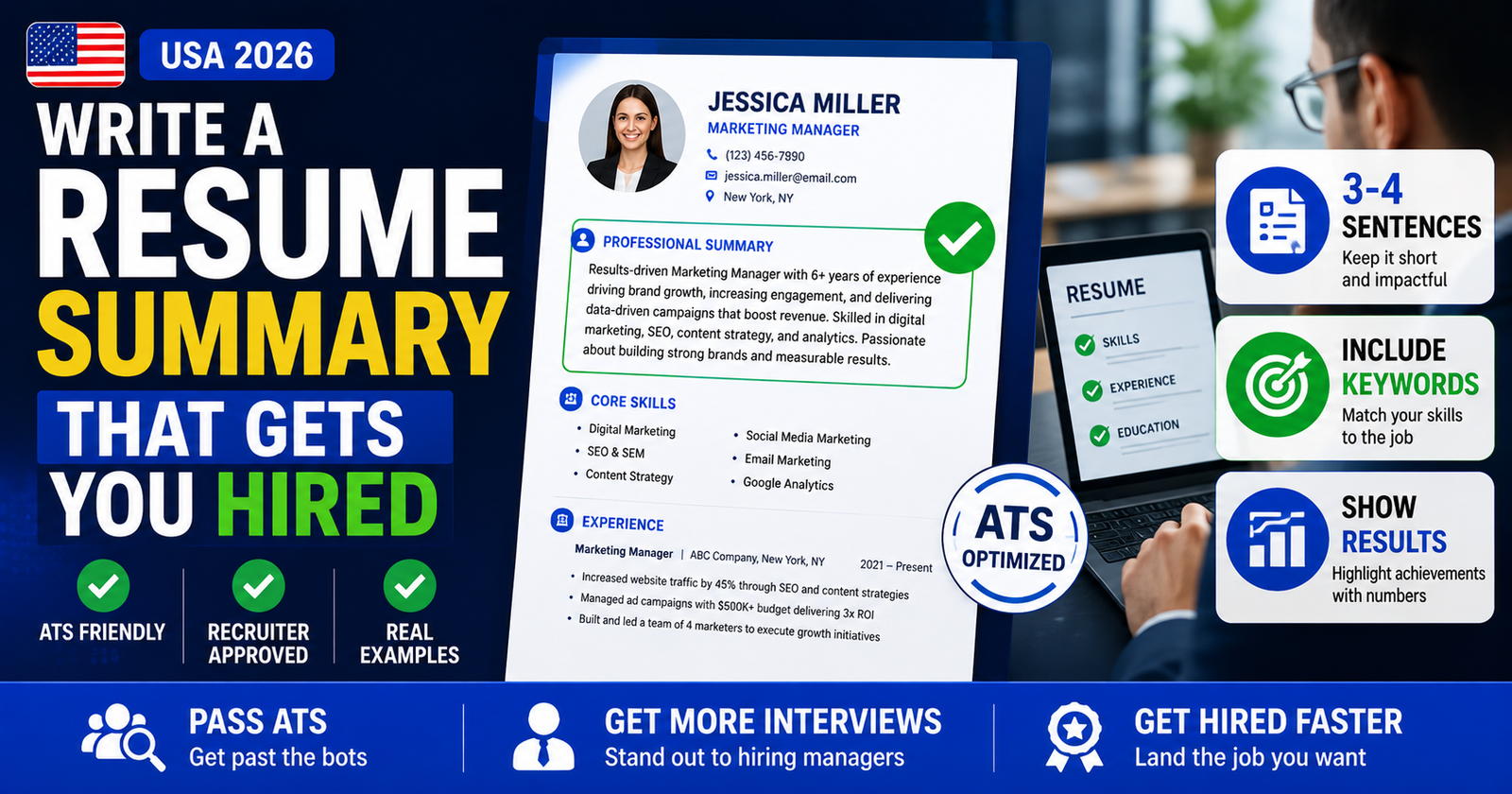
A resume summary is a short paragraph – typically two to four sentences – placed at the very top of your resume, just below your contact information. It gives the hiring manager a quick snapshot of who you are as a candidate: your experience level, your most relevant skills, and one or two things you’ve actually accomplished.
Think of it as your 30-second elevator pitch, written down. The goal isn’t to repeat what’s already in your work history section – it’s to make a strong first impression that convinces the reader to keep going.
Place your summary directly below your name, phone number, email, and LinkedIn URL. It should be the very first piece of content a recruiter reads – before your work history, skills section, or education.
A well-written resume summary answers three questions immediately: What do you do? How much experience do you have? What results have you delivered? If your summary doesn’t answer all three, it needs work.
Resume Summary vs Resume Objective
These two are often confused. A resume summary focuses on your experience and past accomplishments. A resume objective focuses on your career goals and what you’re looking to do next. Here’s when to use each:
| Type | Best For | Focus | Example Situation |
|---|---|---|---|
| Resume Summary | People with 2+ years of work experience | Past achievements and skills | Applying for a senior role, switching companies |
| Resume Objective | Recent grads, career changers, first job seekers | Goals, motivation, transferable skills | Graduating from college, switching industries |
If you have measurable work experience – even just two or three years – a resume summary will serve you better than an objective. It shows the hiring manager what you’ve already done, not just what you hope to do.
Not sure whether to write a summary or objective? Use the Resume Summary Generator or the Resume Objective Generator to build the right one for your situation in seconds.
Who Actually Needs a Resume Summary?
Not everyone does. If your resume is one page, straightforward, and tells a clear story on its own, adding a summary can feel redundant. But in these specific situations, a strong summary is worth the effort:
- You have 5+ years of experience – A summary helps you filter down what matters most so you don’t bury recruiters in details.
- You’re changing industries – A summary lets you frame transferable skills before the hiring manager notices your different background.
- The job posting has very specific requirements – If the employer wants someone with “3+ years in B2B SaaS sales,” say exactly that in your summary.
- You’re applying to competitive roles – For roles that get 200+ applications, a sharp summary helps you stand out in the first five seconds.
- Your job title doesn’t fully reflect what you do – Use the summary to explain what you actually specialize in.
If you’re a recent college grad with limited experience, skip the summary and use a resume objective instead. A vague summary like “Motivated recent graduate looking to grow in a dynamic organization” adds zero value and wastes prime resume real estate.
How to Write a Resume Summary: Step-by-Step
Here’s a practical process you can follow, no matter your industry or experience level.
Step 1 – Read the Job Description Carefully
Before you write a single word, pull up the job posting and highlight the top three to five requirements. These are typically in the first paragraph of the job description and in the “requirements” section. Note the exact phrases and keywords they use – you’ll want those in your summary.
Step 2 – Write Down Your Strongest Selling Points
Ask yourself: What is the most relevant experience I have for this specific role? What’s one result or achievement that proves my value? What two skills do I have that this employer clearly wants? Write rough answers to these questions – don’t worry about phrasing yet.
Step 3 – Lead with Your Job Title and Years of Experience
Start your summary by naming your professional identity and how long you’ve been doing it. This tells the reader immediately whether you’re in the right ballpark. Examples: “Registered Nurse with 6 years of ICU experience” or “Software Engineer with 4 years of full-stack development experience.”
Step 4 – Add One Quantified Achievement
Numbers make your summary credible. Vague claims like “strong track record” mean nothing. Specific results do. Pick your most relevant and impressive accomplishment and express it in numbers wherever possible: revenue generated, percentage improvement, team size managed, cost saved, or volume handled.
Step 5 – Mention 2-3 Relevant Skills
Wrap up your summary by including two or three key skills that directly match what the job posting asks for. These also help your resume get past Applicant Tracking Systems (ATS), which scan for specific terms before a human ever sees your application.
Step 6 – Keep It to 3-4 Sentences Max
A resume summary is not a paragraph essay. Three solid sentences beat five rambling ones every time. Recruiters are reading dozens of resumes – they want to extract your value fast. Cut anything that doesn’t directly support your fit for this specific job.
The Proven Formula
Here’s a simple fill-in-the-blank formula you can use as a starting point for almost any role:
Resume Summary Formula
[Key skill or area of expertise], with a track record of [specific achievement + metric].
Skilled in [Skill 1], [Skill 2], and [Skill 3 from job description].
💼 Filled-In Example: Project Manager
“Project Manager with 7 years of experience in IT and software development. Led cross-functional teams of 10-15 people to deliver 30+ projects on time and under budget, saving an average of $80,000 per project in scope creep costs. Skilled in Agile, Scrum, and stakeholder communication.”
Notice what this summary does: it names the title, shows the experience, gives a real number ($80,000 saved), and ends with specific skills tied directly to what a hiring manager would search for. That’s all you need.
✍️ Build Your Resume Summary in Seconds
Skip the blank page. Use the USAJobsKit Resume Summary Generator to create a professional, job-specific summary in under a minute.
Use Free Resume Summary Generator →Real Resume Summary Examples by Job Type
Here are examples written specifically for common US job roles. Each one follows the formula above and includes specific, credible details.
Registered Nurse
💼 Example
“Registered Nurse with 5 years of experience in emergency and critical care settings across Texas hospitals. Managed a patient caseload of 8-10 per shift, maintaining a patient satisfaction score consistently 20% above the hospital average. Proficient in IV therapy, triage assessment, and electronic health record (EHR) documentation.”
Software Engineer
💼 Example
“Full Stack Software Engineer with 4 years of experience building scalable web applications at mid-size SaaS companies. Reduced page load times by 35% through database optimization and front-end refactoring, directly improving user retention metrics. Proficient in Python, React, and AWS.”
Truck Driver (CDL-A)
💼 Example
“CDL-A Truck Driver with 8 years of OTR experience and a clean driving record across 40+ US states. Averaged 99.6% on-time delivery rate over a 500-mile daily route for a regional distribution center. Experienced with refrigerated freight, hazmat certification, and electronic logging devices (ELD).”
Teacher
💼 Example
“Licensed High School English Teacher with 6 years of classroom experience in public schools in Georgia. Increased student standardized test pass rates from 71% to 89% over two academic years through differentiated instruction strategies. Skilled in Google Classroom, IEP implementation, and curriculum development.”
Entry-Level / Recent Graduate
💼 Example (Resume Objective)
“Recent marketing graduate from Ohio State University seeking an entry-level digital marketing coordinator role. Completed a 3-month internship where I managed organic social content for a brand with 15,000+ followers. Strong skills in Canva, Hootsuite, and Google Analytics.”
Need a headline to match your summary? Use the Resume Headline Generator to create a sharp one-liner that sits above your summary and immediately frames your professional identity.
How to Make Your Summary Pass ATS Screening
Most US employers – including over 98% of Fortune 500 companies – use Applicant Tracking System software to filter resumes before a human reads them. ATS software scans for keywords from the job description. If your resume doesn’t include those keywords, it gets filtered out automatically.
Here’s how to write a summary that beats the ATS filter:
- Use the exact job title from the posting – If the job says “Customer Success Manager,” use that phrase, not “Client Relations Lead.”
- Include skills from the job description – If the posting mentions “Salesforce CRM,” put those exact words in your summary or skills section.
- Avoid graphics, tables, or special characters in your summary – Some ATS systems can’t parse these and will skip your content entirely.
- Don’t put your summary inside a text box in Word – Use plain paragraph formatting so ATS can read it cleanly.
- Spell out acronyms at least once – Write “Search Engine Optimization (SEO)” instead of just “SEO” to cover both variations.
Use the Resume Keyword Scanner on USAJobsKit to check whether your resume contains the right keywords for the job you’re targeting. You can also use the Job Description Keyword Finder to pull the most important terms from any job posting in seconds.
Common Resume Summary Mistakes to Avoid
Most resume summaries fail for the same few reasons. Here’s what to watch out for:
Mistake 1 – Using Generic Filler Phrases
Phrases like “hardworking,” “team player,” “detail-oriented,” and “passionate professional” are in virtually every resume. They carry no weight. Replace them with specific accomplishments or skills.
❌ Weak
“Dedicated and hardworking professional with a passion for customer service and a team-player attitude.”
✅ Strong
“Customer Service Representative with 4 years of experience handling 80+ calls daily, maintaining a 96% satisfaction rating across 3,000+ resolved cases.”
Mistake 2 – Writing a One-Size-Fits-All Summary
If you’re sending the same summary to every employer, you’re leaving interviews on the table. Your summary should be adjusted for each job posting – at minimum, match the job title and include two to three keywords from the job description. It takes five minutes and makes a real difference.
Mistake 3 – Making It Too Long
A resume summary longer than five sentences becomes an obstacle, not an asset. Recruiters skim. If they have to work to find your key points, they’ll move on. Aim for three tight sentences that deliver your title, your top achievement, and your most relevant skills.
Mistake 4 – Writing in Third Person
Third-person summaries like “John is an experienced accountant who…” read as oddly formal and stiff in US hiring culture. Write in first person without “I” – just start with your job title or a descriptor. Example: “Certified Public Accountant with…” rather than “Maria is a CPA with…”
Mistake 5 – Leaving Out Numbers
Vague results don’t impress. “Improved sales” tells a hiring manager nothing. “Grew territory revenue by 28% over 12 months” tells them everything. Any time you can attach a number – a percentage, a dollar figure, a headcount, a timeframe – do it.
❌ Vague
“Experienced sales professional who consistently exceeded targets and contributed to team growth.”
✅ Specific
“B2B Sales Representative with 5 years of experience, consistently exceeding quota by 30-40% and closing an average of $1.2M in annual new business.”
Once you’ve written your summary, use the Resume Skills Generator to round out the rest of your resume with relevant, role-specific skills that reinforce what your summary promises.
✅ Key Takeaways
- A resume summary is 3-4 sentences placed at the top of your resume, below your contact info
- Use a summary if you have 2+ years of experience; use an objective if you’re entry-level or changing fields
- Lead with your job title and years of experience, then add one quantified achievement
- Match keywords from the job description to pass ATS screening
- Customize your summary for each job application – don’t send the same version everywhere
- Avoid vague filler phrases; replace them with specific results and skills
- Keep it under 5 sentences – concise beats long every time