How to Write an ATS Friendly Resume in 2026 (Step by Step Guide)
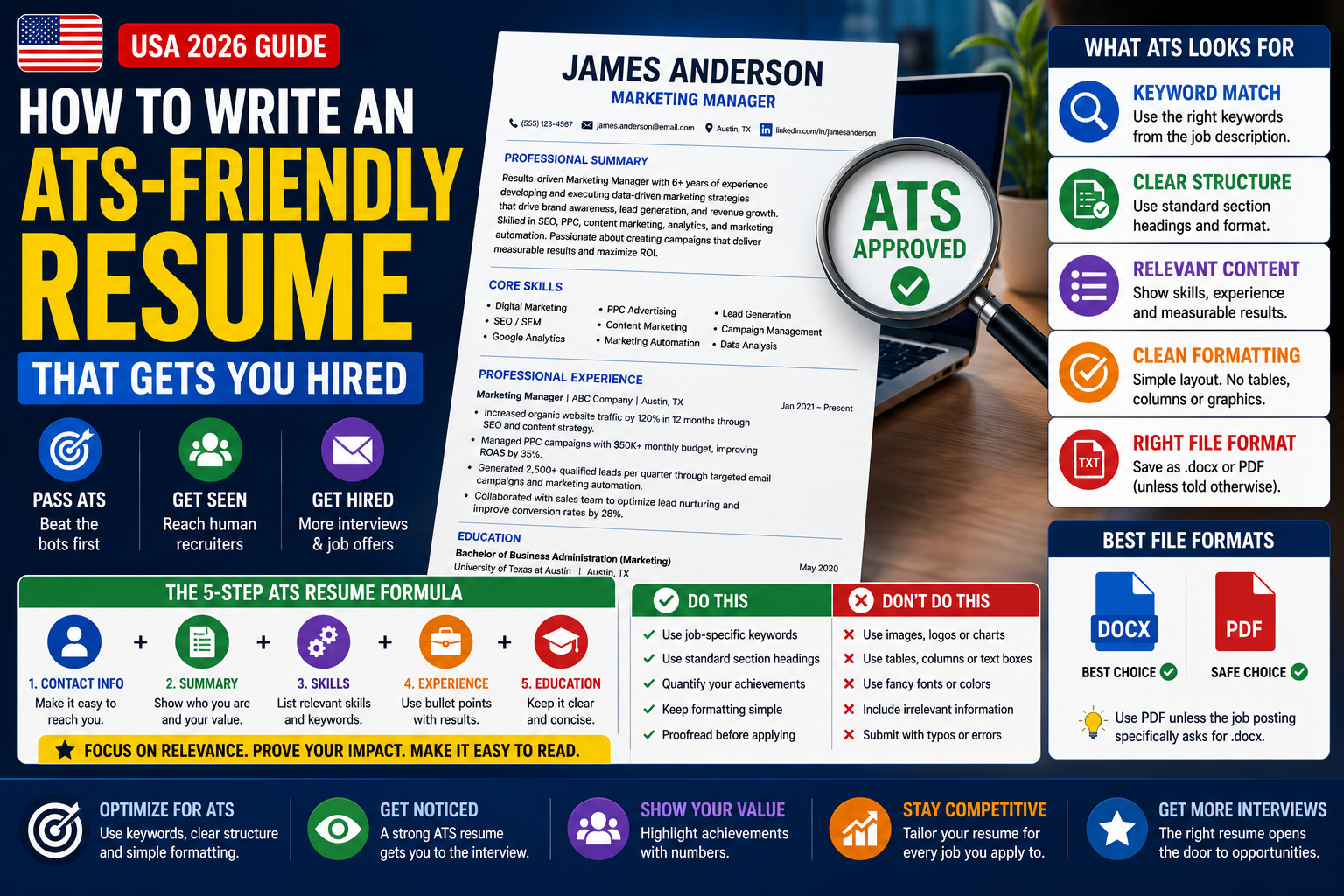
Over 98% of Fortune 500 companies and most mid-size US employers use an Applicant Tracking System (ATS) to screen resumes before a human ever reads them. If your resume isn’t formatted and written to pass that scan, it gets filtered out automatically – no matter how qualified you are. This guide explains exactly how ATS systems work, what they look for, and how to write a resume that passes the scan and impresses the hiring manager on the other side.
How ATS Systems Work in 2026
An Applicant Tracking System is software that employers use to receive, organize, and filter job applications. When you submit your resume online, it doesn’t go directly to a recruiter’s inbox. It goes into the ATS first, where it gets parsed, scored, and ranked against every other applicant.
Here’s the three-step process most ATS platforms follow:
- Parsing: The ATS reads your resume and extracts information – your name, contact details, job titles, companies, dates, skills, and education. If your resume is formatted in a way the parser can’t read, it misreads or loses that information entirely.
- Matching: The ATS compares what it extracted from your resume against the keywords, required skills, and qualifications the employer defined for the role. It looks for exact matches and close synonyms.
- Ranking: Based on match score, the ATS ranks all applicants. Only the top-ranked profiles – typically the top 10-25% – get forwarded to a human recruiter for review.
Passing the ATS is not the finish line – it’s the entry fee. A resume that passes the scanner still needs to impress a hiring manager in under 10 seconds. That’s why ATS optimization and strong writing are not separate goals. You need both: a resume that parses cleanly and a resume that reads well once a human sees it.
The most widely used ATS platforms at US companies in 2026 include Workday, Greenhouse, Lever, iCIMS, Taleo (Oracle), and BambooHR. Each handles formatting slightly differently, but the core rules that make a resume ATS-friendly apply across all of them.
ATS-Friendly Resume Format Rules
Formatting is the most common reason resumes fail ATS screening. A resume that looks polished in a PDF viewer can still be completely unreadable to a parser if it uses columns, text boxes, graphics, or non-standard fonts. Here are the formatting rules that matter most.
Use a Single-Column Layout
Multi-column layouts – two or three columns side by side – are popular in resume templates and Canva designs. They look clean to the eye, but ATS parsers read left to right, top to bottom, like a single document flow. A two-column layout causes the parser to read across both columns simultaneously, mixing your job title with a skill from the other column and producing gibberish. Use one column only.
❌ Multi-Column (ATS Fails)
Left column: Name, Contact, Skills, Education | Right column: Summary, Work Experience. Looks great in Canva. ATS reads it as scrambled nonsense.
✅ Single-Column (ATS Reads Correctly)
Name and contact at top. Summary. Work Experience. Education. Skills. All in one flowing column from top to bottom. Simple, clean, fully parseable.
Use Standard Fonts at the Right Size
Stick to fonts the ATS can reliably read: Arial, Calibri, Garamond, Georgia, or Times New Roman. Font size should be 10-12pt for body text and 14-16pt for your name. Avoid script fonts, decorative fonts, or anything that requires special rendering – parsers treat unrecognized font characters as symbols or blank space.
Use Standard Section Headings
ATS systems are trained to look for headings like “Work Experience,” “Education,” “Skills,” and “Professional Summary.” If you rename these sections with creative alternatives – “Career Journey,” “What I Know,” “My Story” – many parsers won’t recognize them and will either skip the section or misfile the content. Use the standard terms.
Set Margins Between 0.5 and 1 Inch
Margins smaller than 0.5 inches can cause some parsers to clip content. Margins larger than 1.2 inches waste space and force a two-page resume when one would do. The standard is 0.75 to 1 inch on all sides.
No Tables, Text Boxes, Graphics, or Headers/Footers
Tables and text boxes are invisible to most ATS parsers – the content inside them gets dropped entirely. That includes skills sections built as a table grid, contact details placed in a header box, and sidebar elements. Graphics, headshots, logos, and icons are also ignored by parsers and can confuse the extraction process.
Many resume templates place your name, email, and phone number in the document header. Most ATS systems ignore header and footer content entirely. Your contact information will be extracted as blank. Always place your name and contact details in the main body of the document, at the top of the first page.
Section-by-Section Breakdown
Here’s exactly what to include in each resume section, in the order that works best for both ATS systems and human readers.
1. Contact Information
Full name (large, bold), phone number, professional email address, city and state (no full street address needed), LinkedIn profile URL, and optionally a portfolio or GitHub URL. Place this at the very top of the main body – never in a header or text box.
2. Professional Summary (3-4 sentences)
A brief statement of who you are professionally, your top skills, your years of experience, and your target role. This is keyword-prime real estate – work your most important terms in here naturally. Don’t call it “Objective” (outdated) – use “Professional Summary” or “Summary.”
3. Work Experience (Reverse Chronological)
List each role with: Job Title | Company Name | City, State | Month/Year – Month/Year. Under each role, write 3-5 bullet points that start with action verbs and include measurable results. Your most recent role should have the most detail. Focus on the last 10-15 years of experience.
4. Skills Section
A dedicated Skills section significantly boosts ATS keyword matching. Use a simple bullet list or comma-separated format – no skill bars, rating icons, or visual meters. Include both hard skills (software, tools, certifications) and relevant technical skills. Keep it to skills you’d genuinely claim in an interview.
5. Education
Degree type | Major | University Name | Graduation Year. For most mid-career professionals, education goes after work experience. For recent graduates with limited experience, move it above work experience. Include certifications here or in a separate Certifications section.
6. Certifications (if applicable)
List credential name, issuing organization, and year. Use the full name and acronym for certifications – for example, “Project Management Professional (PMP)” – since recruiters may search either. Include both valid and in-progress certifications (label in-progress ones with “Expected [Year]”).
Depending on your field, you may also include: Volunteer Work (if directly relevant), Publications or Presentations (for academic or research roles), Projects (especially for engineers, developers, and recent grads), and Languages (if the job requires bilingual candidates). Only include sections that genuinely strengthen your candidacy for the specific role.
Keyword Strategy: The Core of ATS Optimization
Keywords are the single most important factor in ATS ranking. The system compares your resume’s language to the language in the job description – exact matches and close synonyms score higher than paraphrased equivalents. Here’s how to build a keyword strategy that works.
Step 1 – Analyze the Job Posting
Read the job description carefully and identify three categories of keywords: the job title (exactly as posted), required skills and tools, and industry or domain terms. Words that appear in the first paragraph of the posting and in the “Required Qualifications” section are the highest priority – put those in your resume first.
Step 2 – Use Exact Phrasing When Possible
If the posting says “project management,” use “project management” – not “managing projects” or “project oversight.” ATS systems match strings, not concepts. When a term has both a spelled-out form and an acronym, include both: “Search Engine Optimization (SEO)” covers candidates whether the recruiter searches by acronym or full term.
Step 3 – Weave Keywords Into Experience Bullets
Don’t stuff keywords into a list at the bottom of your resume. The most effective placement is inside your work experience bullet points, where keywords appear in the context of real job responsibilities. This satisfies the ATS and shows a human reader how you actually used those skills.
💡 Keyword Placement Example – Data Analyst Role
Job posting says: “Proficiency in SQL, Tableau, and Python required. Experience with cross-functional stakeholder reporting preferred.”
Weak bullet (keywords missing):
“Analyzed business data and created reports for leadership teams.”
ATS-optimized bullet:
“Analyzed sales and operations data using SQL and Python, building Tableau dashboards for weekly cross-functional stakeholder reporting across four business units.”
Step 4 – Customize for Every Application
A master resume sent to 50 different jobs will underperform a tailored resume sent to 10. Before submitting, spend 10 minutes comparing the job description against your resume and swapping in the exact language the employer used for any skills or responsibilities you share. This one step consistently produces higher ATS match scores.
Use the Job Description Keyword Finder on USAJobsKit to extract the most important keywords from any posting instantly. Then use the ATS Resume Checker to see how well your current resume matches before you submit.
Writing ATS-Optimized Bullet Points
Your work experience bullets do the most heavy lifting in an ATS-optimized resume. They’re where keywords live in context, where results get quantified, and where a hiring manager forms their first real impression of you. Here’s the formula that works.
The Action + What + Result + Tool Formula
Each bullet point should follow this structure: start with an action verb, describe what you did or managed, add the result with a number, and name the tool or skill used. Not every bullet needs all four elements – but the more you include, the more searchable and credible the line becomes.
💡 Bullet Point Formula in Practice
Formula: [Action Verb] + [What You Did] + [Measurable Result] + [Tool/Skill]
Weak bullet: “Responsible for managing social media accounts and growing followers.”
ATS-optimized bullet: “Grew Instagram following from 14,000 to 31,000 over 8 months by implementing a content calendar and A/B testing posting times using Hootsuite and Meta Business Suite.”
Why it works: Keywords (Instagram, content calendar, Hootsuite, Meta Business Suite) are embedded in context. Result is specific (14K to 31K, 8 months). Action verb (Grew) leads strong. No vague language.
Use Strong Action Verbs – Not “Responsible For”
Starting a bullet with “Responsible for” or “Duties included” is one of the most common and damaging resume writing habits. It’s passive, takes up space, and gives no information about your impact. Replace every “Responsible for” with a specific action verb: Managed, Reduced, Built, Increased, Led, Designed, Launched, Negotiated, Trained, Implemented.
❌ Passive and Vague
“Responsible for overseeing customer service operations and ensuring satisfaction among clients in the Western region.”
✅ Active and Specific
“Managed customer service operations for 1,200+ accounts in the Western US, improving CSAT scores from 71% to 89% over 12 months by implementing a new ticketing workflow in Zendesk.”
Quantify Results Wherever Possible
Numbers make bullets believable and searchable. If you improved a process, by how much? If you managed a budget, how large? If you led a team, how many people? Even approximate figures (“approximately $400K,” “team of 8-12”) are better than no figures at all. ATS systems don’t filter on numbers, but human reviewers absolutely do – and a resume full of quantified achievements stands out immediately in a pile of vague ones.
⚡ Write Strong Bullet Points Instantly
Use the USAJobsKit Resume Bullet Point Generator to write achievement-focused, keyword-rich bullets for any role – in seconds.
Use Free Bullet Point Generator →Which File Format to Submit
The format you save and submit your resume in affects how well an ATS parses it. Here’s the current guidance for 2026:
| Format | ATS Compatibility | When to Use |
|---|---|---|
| .docx (Word) | Excellent – best parsed by all major ATS | Default choice for most US job applications |
| .pdf (standard text) | Good – most modern ATS parse it well | Use when the posting allows PDF or specifies it |
| .pdf (scanned image) | Poor – unreadable by ATS | Never use – always export as a text-based PDF |
| Google Docs (shared link) | None – cannot be parsed | Never submit a Google Docs link as your resume |
| Canva PDF | Poor – graphics and columns break parsing | Avoid unless specifically for creative portfolio roles |
| .txt (plain text) | Excellent – fully parseable | Some older ATS systems only accept plain text; follow instructions |
If a job posting specifically requests a .docx file, submit .docx. If it says PDF only, submit PDF. When no format is specified, .docx is the safest default for maximum ATS compatibility. Never submit a Canva-designed resume as your primary application document to an ATS portal – the visual elements that make it look good are the same elements that make it unreadable to a parser.
10 ATS Mistakes That Get Resumes Rejected
These are the most common errors US job seekers make that cause their resumes to fail ATS screening – even when they’re highly qualified for the role.
❌ ATS-Killing Mistakes
- Using a two-column or multi-column layout
- Putting contact info in a document header or footer
- Using tables, text boxes, or sidebar elements
- Adding graphics, icons, photos, or skill bar charts
- Using creative section headings instead of standard ones
- Sending a Canva or image-based PDF
- Using a generic resume for every application
- Omitting acronyms or full forms of certifications
- Starting bullets with “Responsible for” instead of action verbs
- Using special characters (arrows, symbols) as bullet points
✅ ATS Best Practices
- Use a clean, single-column layout
- Place all contact info in the main body at the top
- Use standard bullet points only (• or -)
- Keep the design text-only with white space for readability
- Use standard headings: Work Experience, Skills, Education
- Submit .docx or text-based PDF
- Tailor keywords to each specific job description
- Include both acronym and full form (e.g., PMP, CPA, RN)
- Lead every bullet with a strong action verb
- Use plain bullet dots or hyphens throughout
Pre-Submit ATS Checklist
Before you submit any resume to an online application portal, run through this checklist. It takes about five minutes and catches the most common ATS failures before they cost you an interview.
✅ ATS Resume Pre-Submit Checklist
✅ Key Takeaways
- Over 98% of large US employers use ATS to screen resumes before a human sees them – formatting and keywords are not optional
- Use a single-column layout with no tables, text boxes, graphics, or headers/footers
- Place all contact info in the main document body – never in a document header or footer
- Use standard section headings: Work Experience, Skills, Education, Professional Summary
- Pull the exact keywords from the job posting and weave them into your summary, bullets, and skills section
- Include both the full form and acronym of every certification and key term
- Start every bullet point with an action verb and include at least one quantified result
- Submit as .docx or a text-based PDF – never a Canva export or scanned image
- Customize your resume’s keywords for every application – a tailored resume consistently outranks a generic one
Frequently Asked Questions
Related Resume Tools on USAJobsKit
Related Blog Posts
Related Articles



-
How Your Pay Schedule Affects Your Budget in 2026May 26, 2026