
How to Read Your Paycheck Stub in the US (2026 Guide)
Quick Answer
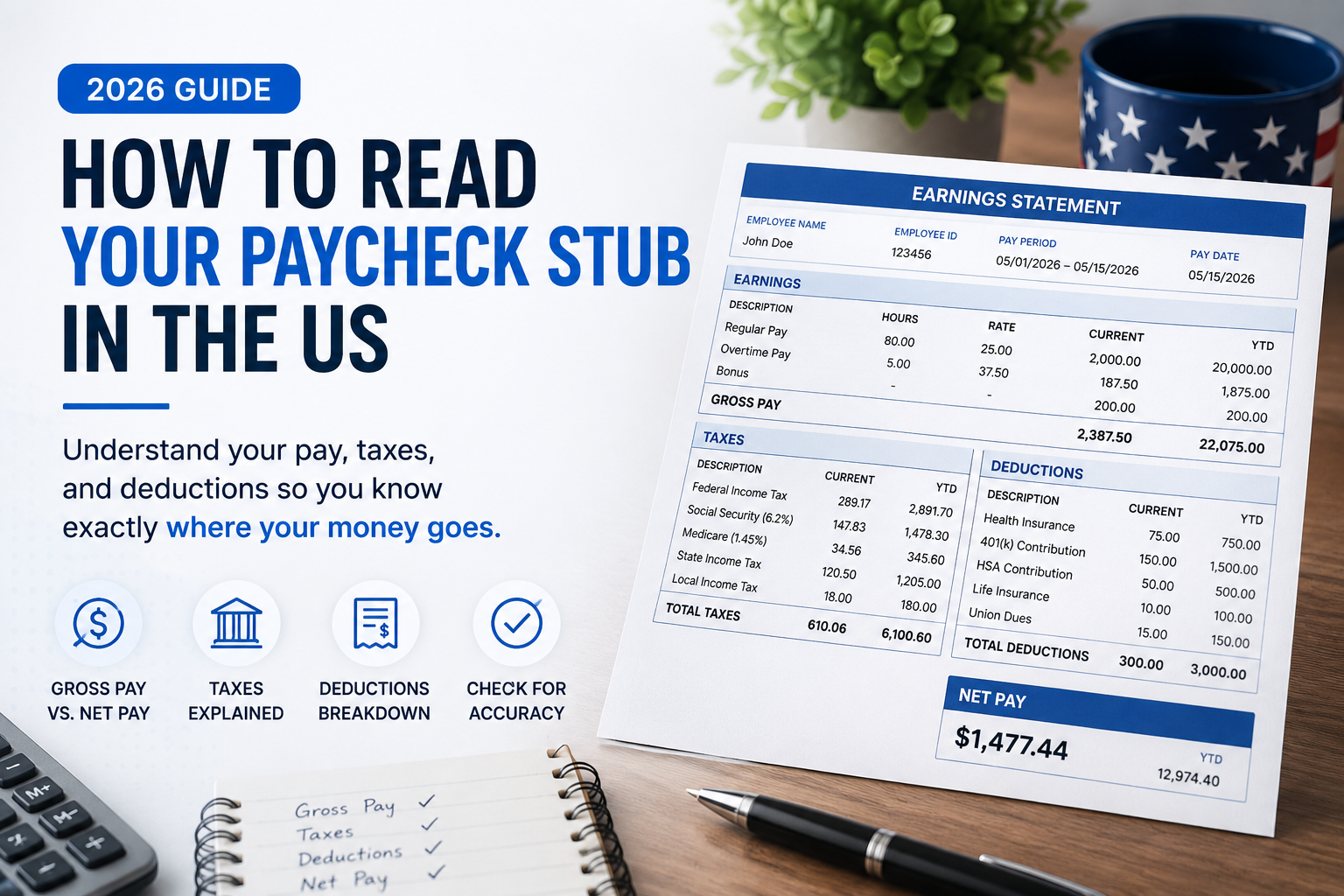
Your paycheck stub is a summary of how your employer turns your hours or salary into the final amount that lands in your bank account. It shows your gross pay (what you earned), your taxes and deductions (what is taken out), and your net pay (what you actually take home). Once you understand each section, you can double check that you are being paid correctly and use tools like the Take Home Pay Calculator and Paycheck Calculator to estimate future paychecks.
Most people glance at the deposit amount and ignore the rest of their paycheck stub. That deposit number matters, but the details above it tell you how your employer calculated that amount, what taxes you are paying, and whether your benefits and deductions are set up correctly.
This guide walks you through every major part of a typical US paycheck stub so you understand what each line means and how it connects to your actual pay. You will also see where your salary and paycheck tools on USAJobsKit fit into the picture so you can check and plan your income more confidently.
1. Pay period and employee information
At the top of your paycheck stub you usually see your employer name and address, your name, and sometimes your employee ID or department. Right next to that is the pay period and pay date.
- Pay period shows the dates you worked for this paycheck, for example “4/1/2026 to 4/15/2026”.
- Pay date is the date the money is actually paid or deposited, for example “4/19/2026”.
- Pay frequency tells you how often you are paid, such as weekly, biweekly, semimonthly, or monthly.
Your pay frequency matters because it affects how big each paycheck is and how many paychecks you receive in a year. To see how different pay schedules change your income flow, you can use the Pay Frequency Calculator or explore the Weekly Pay Calculator, Biweekly Pay Calculator, and Semimonthly Pay Calculator.
2. Earnings: how your gross pay is calculated
The earnings section shows how the employer calculated your pay for this period. It might be labeled “earnings”, “income”, or “hours and earnings”.
You will usually see one or more of these rows:
- Regular pay: your base hourly rate or salary portion for standard hours.
- Overtime pay: hours paid above your regular schedule, often at “time and a half” or another higher rate.
- Double time or holiday pay: special higher rates for certain days or hours.
- Bonuses or commissions: extra earnings paid on top of your base pay.
- Shift differentials: extra pay for nights, weekends, or other special shifts.
Each row typically includes columns for:
- Rate (for example, $25.00 per hour).
- Hours (for example, 80 hours in a biweekly pay period).
- Current total (rate x hours for this pay period).
The sum of all these amounts is your current gross pay. This is the starting point for the rest of the paycheck. If you want to check the math on your hourly or salaried earnings, you can use the Salary Calculator, Hourly to Salary Calculator, or Time Card Calculator.
3. Year to date (YTD) totals
Most paycheck stubs have a “current” column and a “YTD” column. YTD stands for “year to date”. It shows your totals from the beginning of the calendar year up to this paycheck.
- YTD gross income: the sum of all your earnings this year before any taxes or deductions.
- YTD deductions: the total of all taxes and other amounts taken from your pay so far this year.
- YTD net income: the total amount you have actually taken home this year.
These YTD numbers are helpful when you want to see your progress toward annual income goals, check if your tax withholding seems on track, or compare your actual earnings with what you expected. You can cross check your annual projections using the Take Home Pay Calculator and Net Pay Calculator.
4. Taxes: federal, state, and FICA
The deductions section of your pay stub shows money that is taken out of your gross pay before you receive your net pay. The first part of that section usually lists taxes.
Federal income tax
This line is usually labeled “Federal Tax”, “Fed Withholding”, or something similar. It is based on:
- Your total income.
- The filing status and dependents you entered on your W 4 form.
- The IRS withholding tables for the current year.
Federal withholding from each paycheck is meant to prevent a large tax bill at the end of the year. If you consistently owe a lot or always receive a very large refund, it may be a sign to review your withholding. The Tax Withholding Calculator can help you experiment with different W 4 settings.
State and local income tax
Depending on where you live and work, you may see lines such as:
- State Tax or State Withholding.
- City Tax, County Tax, or Local Tax.
- School district or other local deductions in some areas.
Not all states have an income tax. For example, Texas and Florida do not. In those states you will not see a “state tax” line on your pay stub. In states that do have an income tax, this line will reduce your net pay but also reduce what you owe at tax time. To see the impact of state tax on your paycheck, you can use your state specific paycheck calculator, such as the California Paycheck Calculator, New York Paycheck Calculator, or Texas Paycheck Calculator.
FICA Social Security and Medicare
Two very important tax lines on almost every US pay stub are the FICA taxes:
- Social Security tax is typically 6.2 percent of your gross wages up to an annual wage base limit.
- Medicare tax is typically 1.45 percent of your gross wages, with no cap, plus an additional amount for very high earners.
These taxes fund Social Security and Medicare programs. Your employer usually pays an equal amount on top of what you see withheld from your paycheck. If you want to explore how FICA affects your total pay, the FICA Tax Calculator and Medicare Tax Calculator can show more detail.
5. Pre tax deductions: benefits that reduce taxable income
Many paycheck stubs separate “pre tax” and “post tax” deductions. Pre tax deductions are items that are subtracted from your pay before income taxes are calculated. This can lower your taxable income and sometimes reduce your tax bill.
Common pre tax deductions include:
- 401(k) or 403(b) retirement plan contributions.
- Traditional HSA (Health Savings Account) contributions.
- Flexible spending account (FSA) contributions.
- Employee health, dental, or vision insurance premiums.
- Some commuter or parking benefits.
When you see these lines on your pay stub, remember that they usually reduce the gross pay that is used to calculate your federal and sometimes state income taxes. For example, if your gross pay is $2,000 per paycheck and you contribute $200 to a pre tax 401(k), your taxable income for that paycheck might be based on $1,800 instead of $2,000.
You can model the effect of pre tax contributions on your take home pay using tools like the Paycheck After 401k Calculator and the After Deductions Paycheck Calculator.
6. Post tax deductions: items that come out after taxes
Post tax deductions are amounts taken from your paycheck after income taxes have been applied. These do not reduce your taxable income, but they still reduce your final take home pay.
Common post tax deductions include:
- Roth 401(k) or Roth 403(b) contributions.
- Some extra life insurance premiums.
- Union dues.
- Charitable contributions through payroll.
- Garnishments or other required payments.
On your paycheck stub, you might see these grouped under “after tax deductions” or simply listed alongside your benefits. It is important to confirm that these amounts match what you agreed to when you enrolled in benefits or signed any paperwork.
7. Total deductions and net pay
Near the bottom of your pay stub you will usually see a summary that includes:
- Total taxes: the sum of all federal, state, local, and FICA tax lines.
- Total deductions: taxes plus pre tax and post tax deductions combined.
- Net pay: the amount that is actually paid to you. This may also be called “take home pay”.
The basic relationship is:
Gross pay − Total deductions = Net pay
This is the same calculation underlying your take home pay and paycheck calculators. If you want to estimate future net pay before your paycheck arrives, you can use the Take Home Pay Calculator, Net Pay Calculator, or Gross to Net Calculator.
8. Common pay stub abbreviations
Paycheck stubs often use short abbreviations that can look confusing at first glance. Here are some of the most common ones:
| Abbreviation | Meaning |
|---|---|
| YTD | Year to date |
| REG | Regular pay |
| OT | Overtime |
| DT | Double time |
| BON | Bonus |
| COM | Commission |
| FICA | Social Security and Medicare taxes |
| SS | Social Security tax portion |
| MED | Medicare tax portion |
| FED | Federal income tax |
| ST | State income tax |
| 401K | Traditional 401(k) contribution |
Your employer or payroll provider might use slightly different abbreviations, but they usually follow similar patterns. If something is unclear, do not hesitate to ask your HR or payroll team.
9. How to check your paycheck for errors
Small errors on a paycheck stub can quietly cost you money over time. Getting into the habit of checking each paycheck for accuracy is one of the simplest personal finance habits you can build.
Here is a quick checklist:
- Verify your pay rate is correct for your role or latest raise.
- Confirm the number of hours worked, including overtime and holiday pay.
- Check that any bonuses, commissions, or shift differentials you earned appear on the stub.
- Review your federal, state, and local tax withholding to see if anything looks unusually high or low for your pay level.
- Make sure pre tax benefits like your 401(k), HSA, or health insurance are being deducted in the right amounts.
- Look for any new or unexpected deductions you do not recognize.
If you spot a potential mistake, take a screenshot or save a copy of your pay stub and contact your HR or payroll department as soon as possible. It is easier to fix problems early while records are fresh.
10. How to estimate your paycheck before pay day
Once you understand how your pay stub works, the next step is to predict what your future paychecks will look like. This is especially helpful if you are:
- Changing your hours.
- Considering a new job offer.
- Adjusting your 401(k) contributions.
- Planning for overtime or a bonus.
You can use several USAJobsKit tools together to do this:
| What you want to know | Useful tools |
|---|---|
| Convert hourly rate to yearly salary | Hourly to Salary Calculator |
| Estimate net pay from salary | Take Home Pay Calculator |
| Estimate a single paycheck amount | Paycheck Calculator |
| See the effect of 401(k) on pay | Paycheck After 401k Calculator |
| Model overtime income | Overtime Calculator, Time and a Half Calculator |
By comparing your estimated paycheck from these tools to your actual pay stub, you can quickly see whether your pay is on track and how changes in hours or benefits will affect your take home pay.
FAQ
Why is my paycheck smaller than my gross pay?
Your gross pay is your total earnings before anything is taken out. Your paycheck stub then subtracts taxes such as federal income tax, state income tax, and FICA, as well as pre tax and post tax deductions. What is left is your net pay, which is usually quite a bit smaller than your gross pay.
What are FICA taxes on my pay stub?
FICA stands for Federal Insurance Contributions Act. It includes Social Security tax and Medicare tax. These are payroll taxes that fund Social Security and Medicare programs. You pay a percentage of your wages and your employer usually matches that amount.
What is the difference between pre tax and post tax deductions?
Pre tax deductions are taken out of your pay before income taxes are calculated. They can reduce your taxable income and sometimes lower your tax bill. Examples include traditional 401(k) contributions and many health insurance premiums. Post tax deductions are taken out after taxes and do not reduce your taxable income.
How can I check if my paycheck is accurate?
Start by checking your pay rate and hours for the period, including any overtime or bonuses. Then confirm that the taxes and deductions look reasonable for your income level and location. Compare your current pay stub to a previous one to spot sudden changes and use tools like the Paycheck Calculator to see if the net amount matches your expectations.
How can I estimate my paycheck before pay day?
You can estimate your paycheck by taking your hourly wage or salary, multiplying by your expected hours, subtracting expected taxes and deductions, and comparing that to your previous paychecks. The easiest way to do this is to use the Take Home Pay Calculator or Paycheck Calculator, which perform these steps for you.
See how your next paycheck might look
Use your hourly rate or salary, state, and deductions to estimate your next paycheck and match it to your stub line by line.
Disclaimer: This article is for general educational purposes only and does not provide tax, legal, or financial advice. Paycheck formats and tax laws vary by employer and location. For personal advice, please consult a qualified tax or financial professional.





One Comment